Sunday, December 3, 2023

Dive into Python programming in 7 days

Let's dive into the wonderful world of Python programming.


Day 1: Introduction to Python Programming

Python, often dubbed as the "programming language for everyone," is a versatile and beginner-friendly language. In this introductory session, we explore the origins, philosophy, and basic syntax of Python. From print statements to understanding the Python interpreter, you'll take your first steps into the world of coding.

Day 2: Variables, Data Types, and Operators

Today, we delve into the building blocks of any programming language—variables. Learn to store information efficiently using variables, explore different data types (integers, floats, strings), and understand operators to manipulate these values. This forms the foundation for more complex operations in Python.

Day 3: Control Flow and Conditional Statements

Programming isn't just about executing lines of code sequentially. Discover the power of control flow and conditional statements in Python. From if statements to loops, you'll gain the ability to make your programs dynamic and responsive to different scenarios.

Day 4: Loops and Iterations

Building on yesterday's knowledge, today is all about loops and iterations. Understand the for and while loops, and learn how to make your code repeat itself efficiently. This is essential for handling repetitive tasks and processing large amounts of data.

Day 5: Functions and Modularity

Time to make your code more organized and reusable. Introduce yourself to functions, the building blocks of modular programming. Learn to create your functions, understand parameters, and return values. This is a crucial step towards writing efficient and maintainable code.

Day 6: Python Libraries and Modules

Python's strength lies in its vast library ecosystem. Explore the world of Python libraries and modules. From NumPy for numerical operations to Pandas for data manipulation, discover how to leverage existing code to enhance your programs and productivity.

Day 7: Error Handling and Exception Handling

Bugs are an inevitable part of programming. Learn the art of error handling and exception handling in Python. Discover how to anticipate and gracefully handle errors, making your programs more robust and user-friendly.

Day 8: File Handling and Input/Output Operations

Every real-world program deals with data, and Python excels at it. Dive into file handling and input/output operations. Learn how to read from and write to files, an essential skill for any data-driven application.

Day 9: Object-Oriented Programming (OOP)

In the final leg of our journey, understand the principles of Object-Oriented Programming (OOP). Learn to create classes and objects, encapsulate data, and implement inheritance and polymorphism. OOP is a paradigm that brings a new level of organization and structure to your Python projects.

Congratulations! You've completed a comprehensive crash course in Python programming. From the basics to advanced concepts, you now have a solid foundation to explore and build upon. Happy coding!

Thursday, April 28, 2022

gRPC running examples


Overview


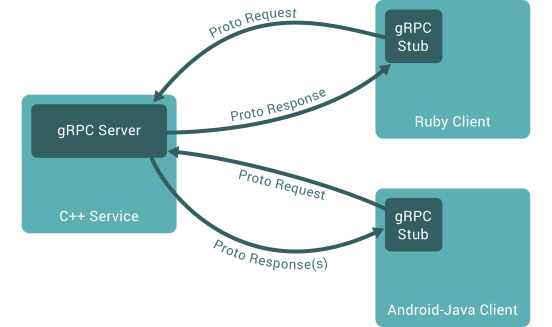
In gRPC, a client application can directly call a method on a server application on a different machine as if it were a local object, making it easier for you to create distributed applications and services.

As in many RPC systems, gRPC is based around the idea of defining a service, specifying the methods that can be called remotely with their parameters and return types. On the server side, the server implements this interface and runs a gRPC server to handle client calls. On the client side, the client has a stub (referred to as just a client in some languages) that provides the same methods as the server.

Concept Diagram

Install gRPC

For python: https://grpc.io/docs/languages/python/quickstart/#grpc

python -m pip install grpcio
python -m python -m pip install grpcio-tools

For c++, it suggests to build from source. For simplicity and spike purpose, we can use vcpkg package to install the library and all its dependencies, though they do not officially support any packaging system for C++.

Links:

for the trial, install gRPC on windows using vcpkg:

# install vcpkg package manager on your system using the official instructions
> cd z:
> git clone https://github.com/Microsoft/vcpkg.git
> cd vcpkg
​
# Bootstrap on Windows instead:
> ./bootstrap-vcpkg.bat
> ./vcpkg integrate install
​
# install gRPC using vcpkg package manager
> vcpkg install grpc:x64-windows

General steps to work with gRPC

  • Define a service in a .proto file.

  • Generate server and client code using the protocol buffer compiler

  • Use the gRPC API to write a simple client and server for your service.

pull the repo to play with grpc examples:

git clone https://github.xxx.com/xx/grpc.git
cd grpc
git checkout python_executor_example

1. define service in proto file

create a proto file named python_executor.proto in folder of grpc\examples\python

syntax = "proto3";
​
option java_multiple_files = true;
option java_package = "io.grpc.p";
option java_outer_classname = "PythonExecutorProto";
option objc_class_prefix = "PEP";
​
package pythonexecutor;
​
service PythonExecutor {
 // Run a python script and get the result as DataFrame
 //
 // the results are streamed if there are repeated DataFrame to return
 // in case the result are fetched and handled page by page
 rpc RunScripts(Script) returns (stream DataFrame) {}
}
​
message Script {
//the python script to evaluate
string script = 1;
}
​
message DataFrame {
   enum Type
  {
       SIMPLEData = 0;
       PandaDF = 1;
       ERRORMESSAGE = 2;
}
 // The name of the feature.
 Type type = 1;
 
 // the real data
 string payload = 2;
}
​

2. generate server/client code using proto compiler on different platforms

for python:

cd grpc\examples\python\python_executor
python -m grpc_tools.protoc -I../../protos --python_out=. --grpc_python_out=. ../../protos/python_executor.proto

for c++:

using cmake to call the proto compiler to generate the code.

> cd grpc\examples\cpp\python_executor
> mkdir cmake\build
> cd cmake\build
> Z:\vcpkg\downloads\tools\cmake-3.21.1-windows\cmake-3.21.1-windows-i386\bin\cmake -DCMAKE_PREFIX_PATH=z:\vcpkg\installed\x64-windows ../..
​
​

python -m install pandas
python -m install simplejson

3. write server/client code for the services

for python, act as the server side

  • to listen the request, expose the service

  • implement the services defined in proto file

# Copyright 2015 gRPC authors.
#
# Licensed under the Apache License, Version 2.0 (the "License");
from concurrent import futures
import logging
​
import grpc
​
import python_executor_pb2
import python_executor_pb2_grpc
import pandas as pd
import simplejson
​
class Greeter(python_executor_pb2_grpc.PythonExecutorServicer):
​
   def RunScripts(self, request, context):
       user_code = request.script
       function_to_evaluate = f'def _user_script():\n'
       for u in user_code.splitlines():
           function_to_evaluate += " " + u + "\n"
       print('function_to_evaluate:')
       print(function_to_evaluate)
       
       exec(function_to_evaluate, globals())
       
       with futures.ThreadPoolExecutor(max_workers=1) as executor:
           future = executor.submit(_user_script)
           result = future.result()
           
           print(type(result))
           
           import types
           if isinstance(result, types.GeneratorType):
               for page in result:
                 if isinstance(page, pd.DataFrame):
                   pddf = page.to_json(orient="table").encode("utf-8")
                   df = python_executor_pb2.DataFrame(type=python_executor_pb2.DataFrame.Type.PandaDF, payload=pddf)
                   print(page.info())
                   yield df
                 else:
                   #todo: error/error, not expected to return other than
                   #pd.DataFrame
                   pass
​
           elif result is not None:
               if isinstance(result, pd.DataFrame):
                   pddf = result.to_json(orient="table").encode("utf-8")
                   df = python_executor_pb2.DataFrame(type=python_executor_pb2.DataFrame.Type.PandaDF, payload=pddf)
                   print(result.info())
                   yield df
               else:
                   # dump as json objects
                   dp = simplejson.dumps(result, ignore_nan=True)
                   df = python_executor_pb2.DataFrame(type=python_executor_pb2.DataFrame.Type.SIMPLEData, payload=dp)
                   print(df)
                   yield df
           else:
               # null result: {}
               df = python_executor_pb2.DataFrame(type=python_executor_pb2.DataFrame.Type.SIMPLEData, payload='{}')
               print(df)
               yield df
​
def serve():
   server = grpc.server(futures.ThreadPoolExecutor(max_workers=10))
   python_executor_pb2_grpc.add_PythonExecutorServicer_to_server(Greeter(), server)
   server.add_insecure_port('[::]:50052')
   server.start()
   server.wait_for_termination()
​
​
if __name__ == '__main__':
   logging.basicConfig()
   serve()
Z:\grpc\examples\python\python_executor> python python_executor_server.py

for c++, as a client, to call the services via the stub:

    // Context for the client. It could be used to convey extra information to
   // the server and/or tweak certain RPC behaviors.
   ClientContext context;
   DataFrame resultDf;
​
   std::unique_ptr<ClientReader<DataFrame> > reader(
       stub_->RunScripts(&context, sc));
​
   while (reader->Read(&resultDf)) {
     std::cout << "\n\nGot one data dataframe ---> \n"
               << "type:" << resultDf->type() << std::endl
               << "size: " << resultDf->ByteSizeLong() << " in bytes"
               << std::endl
               << std::endl;
  }
​
​
   Status status = reader->Finish();
   if (status.ok()) {
     std::cout << "python execution succeeded." << std::endl;
  } else {
     std::cout << "python execution failed." << std::endl
               << status.error_message().c_str()
               << status.error_details().c_str();
  }
​

After we use cmake to generate the project/solution, open with visual studio, to build the project, generate the target file.

> cd grpc\examples\cpp\python_executor\cmake\build\Debug
> set path=Z:\vcpkg\installed\x64-windows\debug\bin;%path%
> python_executor_client.exe
​

Reference

Saturday, August 1, 2020

Embedding Analytics with MicroStrategy REST API

Purpose

Learn to leverage MicroStrategy REST APIs to create your own applications. Embed dossiers in web pages with the Embedding API library, manipulate data objects from a custom application, and push your data into a data cube using custom code.

MicroStrategy products covered

  • MicroStrategy REST API Explorer
  • MicroStrategy Web
  • MicroStrategy Library
  • Push API
  • Embedding API

Topics

  • Fundamentals in REST API
  • Certify a Dossier
  • Embedding a Dossier in an HTML Page
  • Creating Data using Push API

>> 

scala project to support JDK 17

Compiling my Scala project with JDK 17. status: the project once used sbt version 1.2.8 and scala 2.12.8, and targets JDK 11. it works fin...