Overview

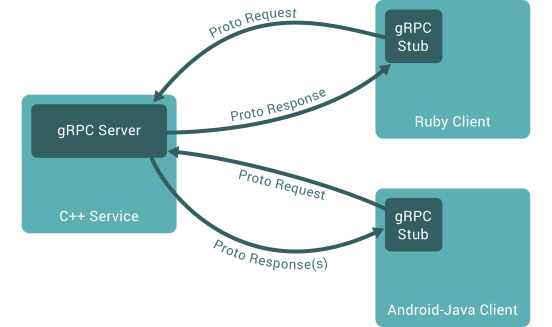
In gRPC, a client application can directly call a method on a server application on a different machine as if it were a local object, making it easier for you to create distributed applications and services.
As in many RPC systems, gRPC is based around the idea of defining a service, specifying the methods that can be called remotely with their parameters and return types. On the server side, the server implements this interface and runs a gRPC server to handle client calls. On the client side, the client has a stub (referred to as just a client in some languages) that provides the same methods as the server.
Install gRPC
For python: https://grpc.io/docs/languages/python/quickstart/#grpc
python -m pip install grpcio
python -m python -m pip install grpcio-tools
For c++, it suggests to build from source. For simplicity and spike purpose, we can use vcpkg package to install the library and all its dependencies, though they do not officially support any packaging system for C++.
Links:
for the trial, install gRPC on windows using vcpkg:
# install vcpkg package manager on your system using the official instructions
> cd z:
> git clone https://github.com/Microsoft/vcpkg.git
> cd vcpkg
# Bootstrap on Windows instead:
> ./bootstrap-vcpkg.bat
> ./vcpkg integrate install
# install gRPC using vcpkg package manager
> vcpkg install grpc:x64-windowsGeneral steps to work with gRPC
Define a service in a .proto file.
Generate server and client code using the protocol buffer compiler
Use the gRPC API to write a simple client and server for your service.
pull the repo to play with grpc examples:
git clonehttps://github.xxx.com/xx/grpc.git
cd grpc
git checkout python_executor_example
1. define service in proto file
create a proto file named python_executor.proto in folder of grpc\examples\python
syntax = "proto3";
option java_multiple_files = true;
option java_package = "io.grpc.p";
option java_outer_classname = "PythonExecutorProto";
option objc_class_prefix = "PEP";
package pythonexecutor;
service PythonExecutor {
// Run a python script and get the result as DataFrame
//
// the results are streamed if there are repeated DataFrame to return
// in case the result are fetched and handled page by page
rpc RunScripts(Script) returns (stream DataFrame) {}
}
message Script {
//the python script to evaluate
string script = 1;
}
message DataFrame {
enum Type
{
SIMPLEData = 0;
PandaDF = 1;
ERRORMESSAGE = 2;
}
// The name of the feature.
Type type = 1;
// the real data
string payload = 2;
}
2. generate server/client code using proto compiler on different platforms
for python:
cd grpc\examples\python\python_executor
python -m grpc_tools.protoc -I../../protos --python_out=. --grpc_python_out=. ../../protos/python_executor.proto
for c++:
using cmake to call the proto compiler to generate the code.
> cd grpc\examples\cpp\python_executor
> mkdir cmake\build
> cd cmake\build
> Z:\vcpkg\downloads\tools\cmake-3.21.1-windows\cmake-3.21.1-windows-i386\bin\cmake -DCMAKE_PREFIX_PATH=z:\vcpkg\installed\x64-windows ../..
python -m install pandas
python -m install simplejson
3. write server/client code for the services
for python, act as the server side
to listen the request, expose the service
implement the services defined in proto file
# Copyright 2015 gRPC authors.
#
# Licensed under the Apache License, Version 2.0 (the "License");
from concurrent import futures
import logging
import grpc
import python_executor_pb2
import python_executor_pb2_grpc
import pandas as pd
import simplejson
class Greeter(python_executor_pb2_grpc.PythonExecutorServicer):
def RunScripts(self, request, context):
user_code = request.script
function_to_evaluate = f'def _user_script():\n'
for u in user_code.splitlines():
function_to_evaluate += " " + u + "\n"
print('function_to_evaluate:')
print(function_to_evaluate)
exec(function_to_evaluate, globals())
with futures.ThreadPoolExecutor(max_workers=1) as executor:
future = executor.submit(_user_script)
result = future.result()
print(type(result))
import types
if isinstance(result, types.GeneratorType):
for page in result:
if isinstance(page, pd.DataFrame):
pddf = page.to_json(orient="table").encode("utf-8")
df = python_executor_pb2.DataFrame(type=python_executor_pb2.DataFrame.Type.PandaDF, payload=pddf)
print(page.info())
yield df
else:
#todo: error/error, not expected to return other than
#pd.DataFrame
pass
elif result is not None:
if isinstance(result, pd.DataFrame):
pddf = result.to_json(orient="table").encode("utf-8")
df = python_executor_pb2.DataFrame(type=python_executor_pb2.DataFrame.Type.PandaDF, payload=pddf)
print(result.info())
yield df
else:
# dump as json objects
dp = simplejson.dumps(result, ignore_nan=True)
df = python_executor_pb2.DataFrame(type=python_executor_pb2.DataFrame.Type.SIMPLEData, payload=dp)
print(df)
yield df
else:
# null result: {}
df = python_executor_pb2.DataFrame(type=python_executor_pb2.DataFrame.Type.SIMPLEData, payload='{}')
print(df)
yield df
def serve():
server = grpc.server(futures.ThreadPoolExecutor(max_workers=10))
python_executor_pb2_grpc.add_PythonExecutorServicer_to_server(Greeter(), server)
server.add_insecure_port('[::]:50052')
server.start()
server.wait_for_termination()
if __name__ == '__main__':
logging.basicConfig()
serve()Z:\grpc\examples\python\python_executor> python python_executor_server.pyfor c++, as a client, to call the services via the stub:
// Context for the client. It could be used to convey extra information to
// the server and/or tweak certain RPC behaviors.
ClientContext context;
DataFrame resultDf;
std::unique_ptr<ClientReader<DataFrame> > reader(
stub_->RunScripts(&context, sc));
while (reader->Read(&resultDf)) {
std::cout << "\n\nGot one data dataframe ---> \n"
<< "type:" << resultDf->type() << std::endl
<< "size: " << resultDf->ByteSizeLong() << " in bytes"
<< std::endl
<< std::endl;
}
Status status = reader->Finish();
if (status.ok()) {
std::cout << "python execution succeeded." << std::endl;
} else {
std::cout << "python execution failed." << std::endl
<< status.error_message().c_str()
<< status.error_details().c_str();
}
After we use cmake to generate the project/solution, open with visual studio, to build the project, generate the target file.
> cd grpc\examples\cpp\python_executor\cmake\build\Debug
> set path=Z:\vcpkg\installed\x64-windows\debug\bin;%path%
> python_executor_client.exe
